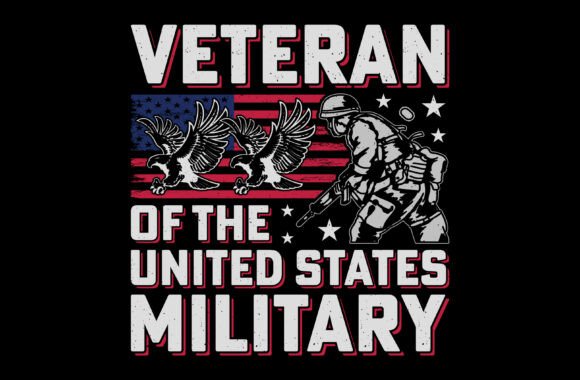
U.S. Military Veteran Sublimation Graphic: A Design Asset for Patriotic Projects
Understanding the Visual Character of This Veteran Graphic
When you're working on a project that honors military service, the visual elements you choose carry significant weight. This U.S. Military Veteran Sublimation Graphic isn't just another clipart file; it's a thoughtfully constructed design piece built for clarity and impact. At its core, it features a strong, central soldier silhouette integrated with classic symbols of American service—the eagle and the flag. The style leans into a grunge, vintage aesthetic, giving it texture and a sense of history without sacrificing legibility.
The personality of this graphic is one of respectful pride. It's bold and eye-catching, designed to be noticed on a t-shirt or a poster from a distance. The use of distressed textures adds a layer of authenticity, suggesting a design that has been earned rather than just made. This isn't a sterile, corporate logo; it's a piece of visual storytelling meant to connect with an audience that values patriotism, freedom, and sacrifice. The typography elements, when included, are often strong and straightforward, complementing the imagery without competing with it.
Practical Applications Beyond the T-Shirt
While the product listing highlights its use on apparel, the true versatility of this U.S. Military Veteran Sublimation Graphic lies in its file package. Receiving an EPS, SVG, PNG, and JPG in a high 2000x2000 pixel resolution at 300 dpi means you're equipped for nearly any medium. The vector formats (EPS and SVG) are your workhorses for scalable projects. This is critical for large-format printing like banners for a local VFW event, vinyl decals for a veteran-owned business storefront, or intricate cuts on materials like wood or leather using a CNC or laser engraver.
The PNG file with its transparent background is perfect for layering in digital designs. Imagine creating social media graphics for Memorial Day or Veterans Day, or designing a compelling hero image for a non-profit's website. For crafters and small business owners, this file set enables a consistent product line. You can use the same core design to create a coordinated set: a sublimated t-shirt, a printed mug, a sticker for a laptop, and an iron-on patch for a bag. This consistency is key to building a recognizable brand identity around patriotic or veteran-focused themes.
Key Project Ideas Using These Files:
- Apparel & Merchandise: T-shirts, hoodies, hats, and tote bags using sublimation or direct-to-garment printing.
- Print & Decor: Posters, greeting cards, invitation designs for military retirement ceremonies, and printable wall art.
- Physical Products: Custom mugs, engraved plaques, tumblers, and phone cases.
- Craft & DIY: Vinyl decals for vehicles or windows, heat transfers for hats, and scrapbooking elements.
- Digital Media: Website banners, email newsletter graphics, and social media posts for veteran-focused businesses or communities.
Integrating the Graphic into Your Design Workflow
Using a pre-designed graphic like this effectively requires a bit of strategy. First, consider the context of your final product. For a vintage-style t-shirt, the grunge texture is an asset. For a formal certificate of appreciation, you might want to use the SVG file to isolate just the eagle or the flag silhouette for a cleaner look. The vector format gives you that flexibility to edit, recolor, and deconstruct the elements in Adobe Illustrator or a similar program.
When pairing this graphic with other design assets, especially fonts, opt for simplicity. A strong, clean sans-serif font for a tagline or a classic serif font for a formal heading will balance the detailed, textured nature of the main graphic. Avoid overly ornate script or handwritten fonts that could clash and reduce readability. The goal is to let the veteran graphic be the hero of the design. Always test your final composition by viewing it at the intended size—what looks good on a screen might need adjustments to ensure all elements are crisp and clear when printed on fabric or etched onto metal.
Choosing and Evaluating Your Design Files
- Check the Formats: Ensure the package includes the files you need for your software and projects (vector for scaling, raster for digital use).
- Inspect the Resolution: A minimum of 300 dpi at the final print size is non-negotiable for high-quality printing to avoid pixelation.
- Test Editability: Open the EPS or SVG in your vector editor. Can you easily change colors, remove parts, or adjust paths? This is crucial for customization.
- Review Commercial Licensing: Understand the terms. This graphic is provided for creating end products for sale, which is essential for entrepreneurs and small businesses. The license typically covers the physical items you produce, not the resale of the digital file itself.
Ultimately, a resource like the U.S. Military Veteran Sublimation Graphic saves significant design time while providing a professional, thematic foundation. It allows you to focus on composition, color schemes, and marketing rather than building complex patriotic imagery from scratch. By leveraging its multiple file formats and thoughtful design, you can produce a wide range of respectful, high-quality products that resonate deeply with your target audience, whether they are veterans themselves, their families, or supporters of the military community.